
OAuth 2.0 Integration Guide
How an operator grants your app access to their Monta data, and how to obtain and use tokens.
Use this guide to implement the OAuth handshake that lets Monta operators grant your Partner app access to their data.
Who this is for
Engineers at a partner company integrating with the Monta Partner API on behalf of Monta operators. If you authenticate with a client ID and secret issued directly to you (Basic auth), you are on the legacy credential flow and this guide does not apply.
Read this after the sandbox guide
This page is the reference for the OAuth handshake itself. Build and test everything else—endpoints, webhooks, and the install lifecycle—in the sandbox first, then certify the handshake against production as described in Going live. The handshake is not available in sandbox by design: it is certified against the endpoints you actually ship with.
Use a Partner app when
- You build an integration that many Monta operators can install.
- You need each operator to explicitly grant your app scoped access to their data.
- You plan to distribute the app publicly in the marketplace or to a targeted operator allowlist.
The moving parts
| Term | Meaning |
|---|---|
| Partner organisation | Your company, registered and approved by Monta. |
| App | Your integration's catalogue entry. It owns your OAuth client, requested scopes, and webhook URL. |
| Operator | A Monta customer (a charge-point operator) who decides whether to install your app. |
| Install | One operator's grant of your app. It is created at consent and revoked on uninstall. |
| Consumer | The API credential Monta mints per install. Your token resolves to it; you never handle it directly. |
One app can have many installs. Your client credentials are per-app and long-lived, while access to an operator's data is per-install and that operator can revoke it without affecting other installs.
Onboarding
- Submit your app with its name, description, requested scopes, redirect URIs, and webhook URL.
- Wait for Monta to review and approve the app.
- Open the one-time reveal link sent to your registered contact address and store the credentials.
The reveal link shows these values once:
client_idclient_secretwebhook_secret— the HMAC key for verifying webhook deliveries
Store all three values immediately
Monta stores the client secret only as a hash and cannot show it again. If you lose it, Monta must re-issue the client. Re-issuing rotates both
client_idandclient_secretand invalidates the previous pair.
Your client is registered as a confidential client:
| Property | Value |
|---|---|
grant_types | authorization_code, refresh_token |
response_types | code |
token_endpoint_auth_method | client_secret_post |
scope | Exactly the scopes your app requested. |
redirect_uris | Exactly the URIs you registered—exact string match, with no wildcards or path suffixes. |
Start the authorization flow
The operator starts the flow from Monta Hub. They find your app in the catalogue, select Connect, and Monta builds the authorization request before redirecting their browser to Monta's identity provider.
Do not construct the authorization URL or add a “Connect with Monta” button in your product. Your only inbound surface is your registered redirect_uri.
Why this flow does not use PKCE
Monta initiates the authorization request and you redeem the code, so no single party holds both halves of a PKCE challenge. Confidential clients authenticate with
client_secret_postand do not sendcode_challenge. Public clients must use PKCE and are not eligible for this flow.
End-to-end sequence
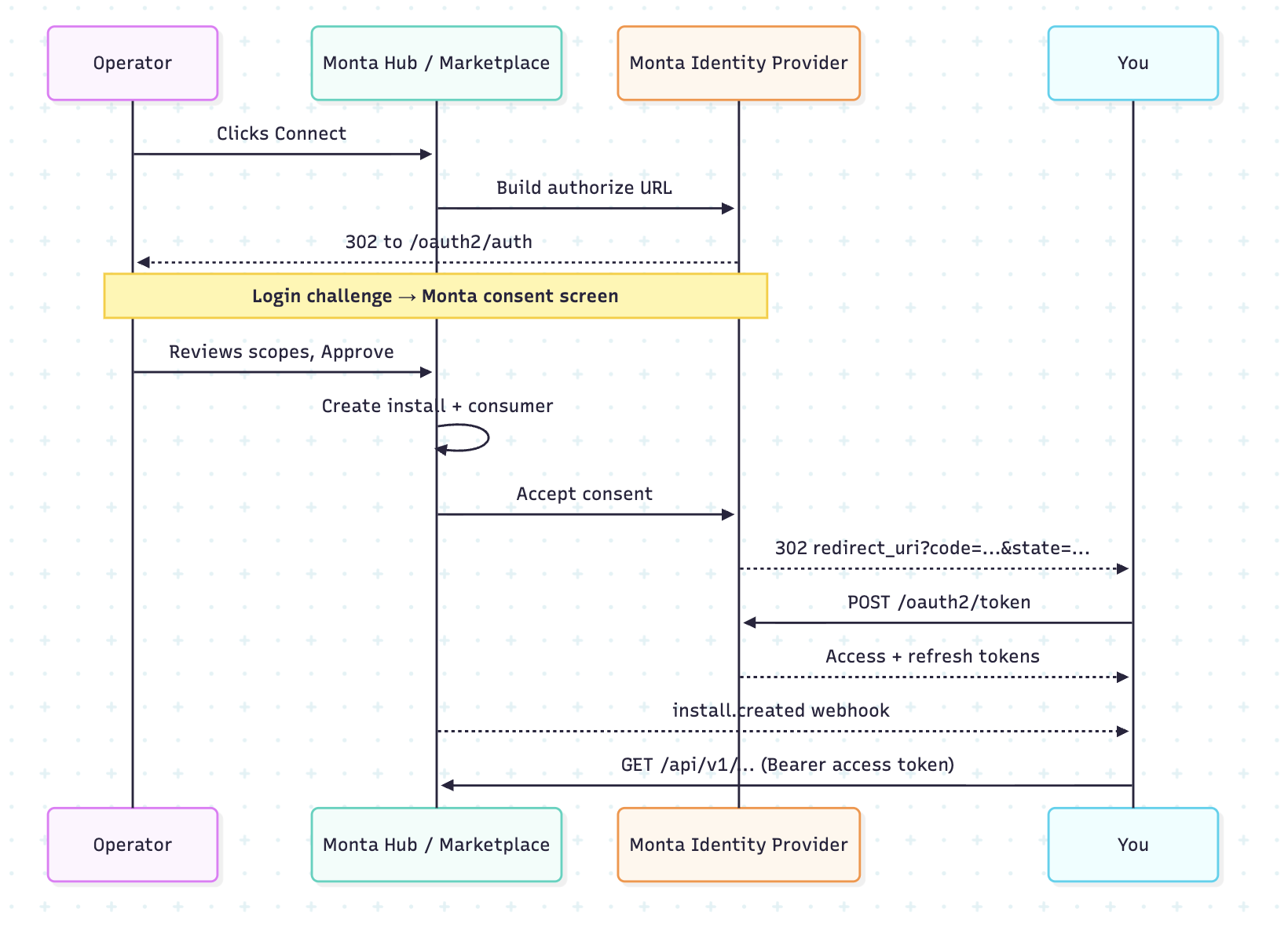
When the operator approves access, Monta creates the install and its consumer before redirecting to your app. Monta also binds the install, operator, and consumer identifiers to the token session, allowing the Partner API to resolve the token to the correct operator.
Redeem the code
Redeem the authorization code immediately in your callback handler:
curl -X POST {issuer}/oauth2/token \
  -H "Content-Type: application/x-www-form-urlencoded" \
  -d grant_type=authorization_code \
  -d code=ory_ac_... \
  -d redirect_uri=https://your.app/callback \
  -d client_id=<your_client_id> \
  -d client_secret=<your_client_secret>
A successful response includes an access token and its granted scopes:
{
  "access_token": "ory_at_...",
  "refresh_token": "ory_rt_...",
  "token_type": "bearer",
  "expires_in": 3599,
  "scope": "charge-points:read charge-transactions:read offline_access"
}| Item | Lifetime |
|---|---|
| Authorization code | 1 minute, single use |
| Access token | 1 hour |
| Refresh token | 30 days, rotating—each refresh returns a new token, so always persist the latest value. |
| Login / consent request | 30 minutes |
Redeem the code in the callback handler
The authorization code is valid for one minute and can only be used once. Do not send it to a background queue. The
redirect_uriin the token request must exactly match the URI used in the authorization request.
Refresh the token
Refresh before the access token's one-hour expiry:
curl -X POST {issuer}/oauth2/token \
  -H "Content-Type: application/x-www-form-urlencoded" \
  -d grant_type=refresh_token \
  -d refresh_token=ory_rt_... \
  -d client_id=<your_client_id> \
  -d client_secret=<your_client_secret>
Refresh tokens rotate: each response contains a new refresh_token and invalidates the previous one. Always persist the newest value. Replaying an already-used refresh token revokes the whole chain, and the operator must then re-install.
offline_access is added by Monta rather than requested by your app. It appears on the operator's consent screen and in your token response's scope, and it is what allows Monta to issue a refresh token. On its own it grants no access to data.
Call the Partner API
curl {partnerApiBaseUrl}/charge-points?perPage=50 \
-H "Authorization: Bearer ory_at_..."- Use
/api/v1as the base path. See the API Reference for available endpoints. - Treat access tokens as opaque bearer strings. They have an
ory_at_prefix, but are not JWTs and must not be decoded or validated locally. - Monta introspects each token, resolves it to the operator's consumer, and enforces consumer status, re-authorization requirements, and granted scopes.
Scope format: resource or resource:permission, where permission is read, write, or delete. For example: charge-points:read and teams:write. A bare resource is read-only. Request resource:write or resource:delete explicitly if you need more. Request the narrowest scopes you need because the operator sees the exact list during consent.
Rate limits: Each install has its own budget of 1,000 requests per 60 seconds by default. Traffic from one operator cannot exhaust another operator's limit.
Handle scope changes
If you later request additional scopes, existing installs are not upgraded automatically. Monta flags each affected install, and API calls return HTTP 403 with NEEDS_REAUTH:
{
  "errorCode": "NEEDS_REAUTH",
  "message": "Re-authorisation required for install 41 after a scope change",
  "context": {
    "install_id": 41,
    "reauth_url": "https://…/41/reauth"
  }
}
Handle NEEDS_REAUTH separately from other 403 responses: stop calling the API for that install, show the re-authorization state in your product, and send the operator to reauth_url. After the operator grants consent again, your existing tokens work with the widened scopes. Narrowing scopes does not trigger re-authorization.
Verify webhooks
| Event | Meaning |
|---|---|
install.created | An operator installed your app. It carries install_id, operator_id, and slug. Your credentials come from the reveal link. |
install.revoked | The operator uninstalled your app. Stop using tokens for that install. |
install.config.updated | The operator changed your app's per-install configuration. |
Verify every delivery before parsing its body:
- Read
X-Monta-Signature: sha256=<hex>. - Calculate HMAC-SHA256 over the raw request body with your
webhook_secret. - Compare signatures in constant time.
- Use the signed
delivered_atepoch timestamp to reject stale or replayed deliveries.
import hashlib
import hmac

expected = "sha256=" + hmac.new(
    secret.encode(), raw_body, hashlib.sha256
).hexdigest()

if not hmac.compare_digest(expected, request.headers["X-Monta-Signature"]):
    abort(401)
Your endpoint must use HTTPS, be publicly resolvable, and return a 2xx response within 10 seconds.
Webhook delivery is best-effort
Monta does not automatically retry a timeout, non-
2xxresponse, or transport error. Monta can replay deliveries for your app on request. Treat webhooks as an accelerator and reconcile authoritative state from the API; do not makeinstall.createdyour only source of credentials because you already receive them through the reveal link.
Handle revocation and uninstall
- An operator can uninstall at any time. Monta revokes the install, disables its consumer, and sends
install.revoked. - Existing access tokens for that install stop working.
- Your app-level
client_idandclient_secretremain valid, and other operators' installs continue to work. - Only one active install can exist for an app and operator. A re-install creates a new install with a new identifier.
Security summary
| Concern | How it is handled |
|---|---|
| Client authentication | client_secret_post; Monta stores the secret only as a hash. |
| Token format | Opaque and introspected server-side, enabling immediate revocation without key distribution. |
| Redirect URIs | Exact-match allowlist; a removed URI stops being accepted immediately. |
| Consent | Per operator and displays the exact scope list; widening scopes forces re-consent. |
| Webhook authenticity | HMAC-SHA256 over the raw body with a per-app secret and a signed timestamp. |
| Blast radius | Credentials are per-app; data access is per-install and independently revocable. |
Endpoints
The OAuth handshake exists in production only. See the sandbox guidance at the top of this page before you begin certification.
| Purpose | Production |
|---|---|
| Issuer / OAuth base | On Request |
| Authorize | {issuer}/oauth2/auth (Monta builds this) |
| Token | {issuer}/oauth2/token |
| Discovery | {issuer}/.well-known/openid-configuration |
| Partner API | https://partner-api.monta.com/api/v1 |
For sandbox endpoints and the credential exchange used there, see Building in the sandbox.
Troubleshooting
| Symptom | Cause and fix |
|---|---|
invalid_client — “The requested OAuth 2.0 Client does not exist” | Your client is not registered with the identity provider or was removed. Contact Monta to re-issue it; this rotates your secret. |
invalid_grant during token exchange | The code expired, was already used, or the redirect_uri differs from the authorization request. |
401 on API calls | The access token expired or the install was revoked. Refresh the token; if refresh fails, the install was revoked and the operator must re-install. |
403 with NEEDS_REAUTH | Your app's scopes widened. Follow the re-authorization flow described in Handle scope changes. |
No install.created received | Delivery is best-effort. Confirm that your HTTPS endpoint is reachable and returns 2xx within 10 seconds, then ask Monta to replay the event. |
Monta performs webhook replays, credential re-issues, and operator-allowlist expansions for you. Contact SUPPORT_CHANNEL_TO_FILL to request these operations.
Integration checklist
- Store the client credentials and webhook secret from the reveal link.
- Register the deployed HTTPS
redirect_uriexactly. - Redeem the authorization code immediately within the one-minute window.
- Handle refresh-token rotation and always persist the newest refresh token.
- Treat access tokens as opaque strings.
- Verify each webhook signature in constant time before parsing its body, and check
delivered_at. - Return
2xxfrom the webhook endpoint in under 10 seconds. - Handle
403 NEEDS_REAUTHseparately from other403errors. - Stop all use of an install after
install.revoked. - Respect the 1,000 requests per 60 seconds, per-install limit and apply backoff.
- Reconcile state without depending solely on webhook delivery.
Updated 2 days ago